

Focused transfer-point modeling from DXF import to engineering review.
Chute Maven Classic keeps the original product's clear workflow and updates it for the current Windows release: import, define, simulate, review, and iterate.
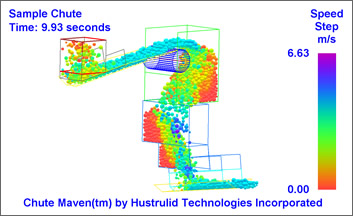
- Import geometry. Bring in chute, belt, pulley, and injection-point geometry from AutoCAD DXF files.
- Use familiar AutoCAD surfaces. Work with 3D Face, 3D Mesh, Edge, Tabulated Surface, Revolved Surface, Ruled Surface, and Edge Surface commands.
- Choose units. Build models in US units or metric units.
- Assign belt behavior. Belt surface velocities are recognized and applied during setup.
Define conditions
Set particle size, density, contact friction, restitution, rotation behavior, time windows, and injection locations.
Run faster studies
The Classic release keeps the proven workflow while using the current faster simulation engine for Windows.
Review in 3D
Pan, rotate, zoom, step through frames, and inspect material movement from any practical vantage point.
Export results
Create AVI videos, capture bitmap images, and output particle positions, speeds, and boundary forces.
Iterate designs
Create restart files from simulation points so the next design iteration can begin from a useful state.
Manage licensing
Activate the Windows desktop application with a Maven Software license key and get licensing support from Maven Software.